
The inverter data is also available on the screen; however, viewing it online provides a much clearer overview. This chart is mainly used for quick checks during system inspections, for verifying customer feedback, or when we ourselves are the consumers.
1.First, open Deye Cloud.
2.Select a plant in which you want to view the data.
3.In the upper-right corner, choose the Devices / Eszközök menu.
You will encounter the following diagram:
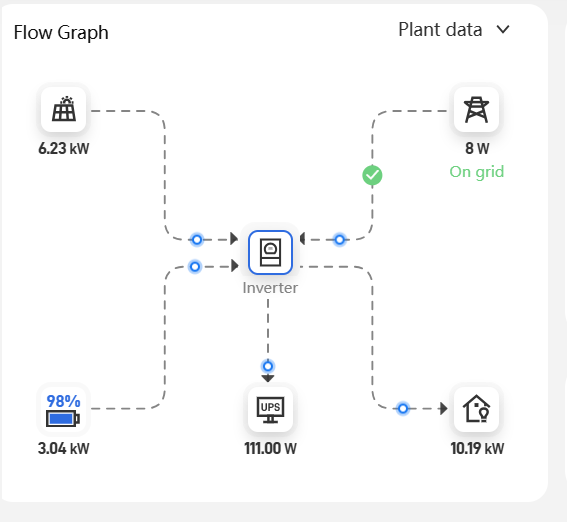
At the top left of the diagram, the solar panel is displayed — this can only be positive, indicating the power coming from the PV modules.
At the bottom left, you can see the battery — if it is positive, the battery is supplying current to the house; if negative, it is charging.
At the bottom center is the critical load circuit (load port) — this can only be positive and represents the combined power consumption of the loads connected there.
At the bottom right is the house (grid port) — this can only be positive, indicating the consumption of devices connected to the grid port.
Finally, at the top right, you will find the grid. When the grid value is positive, we are importing power from the grid; when it is negative, we are feeding power back into the grid.