
Step 1:
Access the Settings menu located in the upper right corner of the inverter’s LCD screen.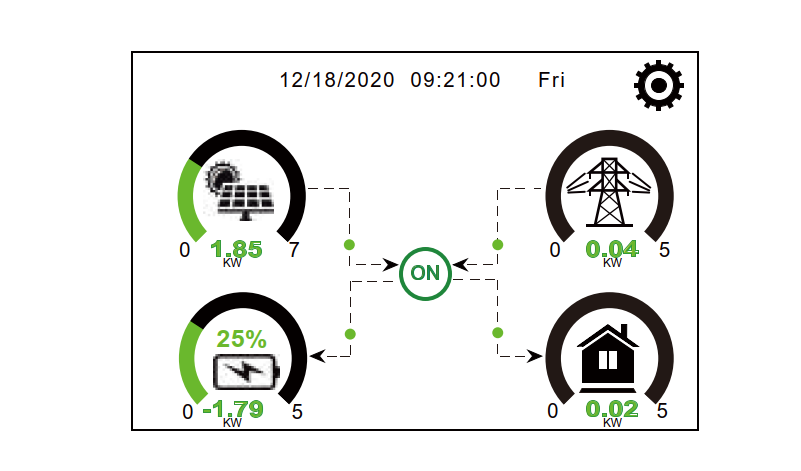
Step 2:
Within the settings, open the Basic Settings menu.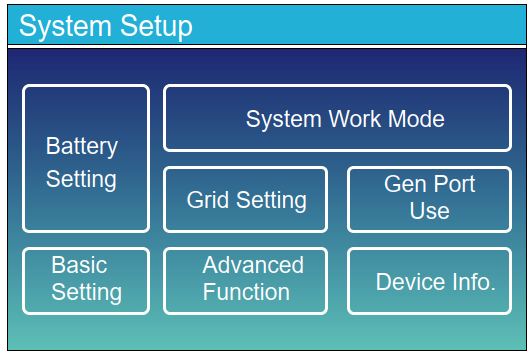
Uncheck the box next to “Lock out all changes”.
This option is password-protected — enter 7777 to unlock.
Step 3:
After enabling changes, go to the Grid Setting menu from the main menu.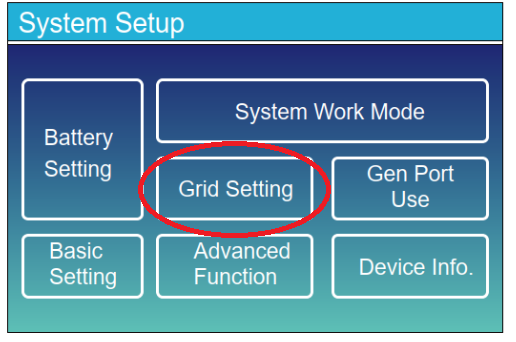
Step 4:
Under Phase Type, you will see two options:
- 0/120/240
- 0/240/120
Select the option that is not currently selected.
Changing this parameter aligns the inverter’s phase order with the local grid configuration.
When prompted with a warning that this adjustment should only be made if you know what you are doing, confirm by pressing the checkmark.
Important Note:
If the error persists even after physically reversing the phase wires, it may not automatically clear.
In this case, change the Phase Type setting as if you hadn’t reversed the wiring, then switch it back to the original setting.
This forces the software to recheck the phase sequence.
After changing the phase sequence, the display will briefly show “Grid Mode Changed”, and the inverter will restart automatically after about 30 seconds.