---
title: Setting Up Huawei Feed-in Limitation (Zero Export Protection)
description: Feed-in limitation (or zero export protection) is required when the utility provider does not permit energy to be fed back into the local grid. In such cases, Huawei inverters allow several configuration options to ensure that the system does not export energy to the grid.
---
[Skip to content](https://support.solar-kit.eu/en/knowledge-base/huawei-visszwatt-védelem-beállítása#main-content)
- [English](https://support.solar-kit.eu/en/knowledge-base/huawei-visszwatt-v%C3%A9delem-be%C3%A1ll%C3%ADt%C3%A1sa)
- [Magyar](https://support.solar-kit.eu/hu/tudastar/huawei-visszwatt-védelem-beállítása)
English
Show submenu for translations
[](https://support.solar-kit.eu/en/knowledge-base?hsLang=en)
Open main navigation
Close main navigation
- - [English](https://support.solar-kit.eu/en/knowledge-base/huawei-visszwatt-v%C3%A9delem-be%C3%A1ll%C3%ADt%C3%A1sa)
- [Magyar](https://support.solar-kit.eu/hu/tudastar/huawei-visszwatt-védelem-beállítása)
English
Show submenu for translations
- [Go to the webshop](https://shop.solar-kit.eu/)
[Go to the webshop](https://shop.solar-kit.eu/)
How can we help?
- There are no suggestions because the search field is empty.
1. [SOLARKIT Knowledge Base](https://support.solar-kit.eu/en/knowledge-base?hsLang=en)
2. [Huawei](https://support.solar-kit.eu/en/knowledge-base/huawei?hsLang=en)
# Setting Up Huawei Feed-in Limitation (Zero Export Protection)
## Feed-in limitation (or zero export protection) is required when the utility provider does not permit energy to be fed back into the local grid. In such cases, Huawei inverters allow several configuration options to ensure that the system does not export energy to the grid.
**Step 1:** Log in to the **FusionSolar** application.
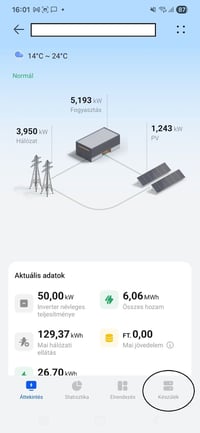
Under the **Device** menu in the lower right corner, you can find the system components.
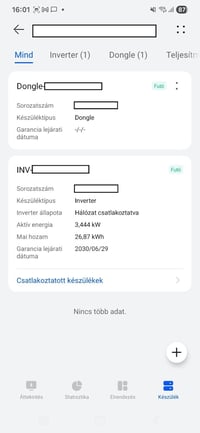
**Step 2:** Enter the **Device** menu and select the **Dongle** device.
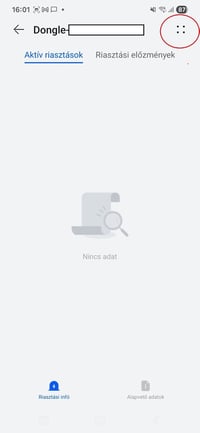
**Step 3:** After selecting the dongle, open the **Settings** by clicking on the **four dots** in the upper-right corner.
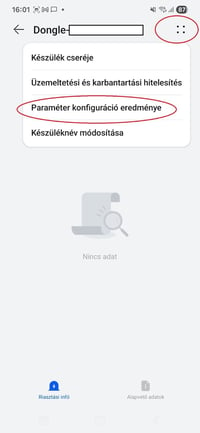
**Step 4:** The settings can be accessed under **Parameter Configuration Result**.
**Step 5:** Once inside the **Parameter Configuration Result**, locate the **Active Power Control Mode** option.
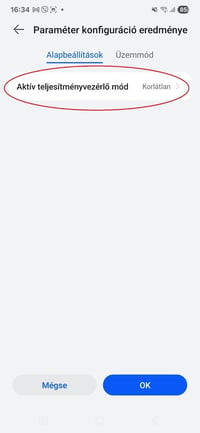
**Step 6:** Set the **Active Power Control Mode** to **Zero Export Limitation**.
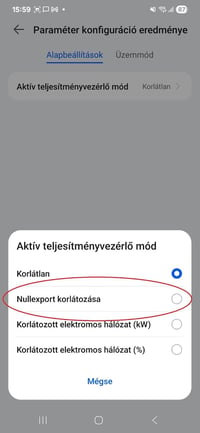
**Step 7:** Finally, select the chosen **Zero Export Limitation** mode and **save** the configuration.
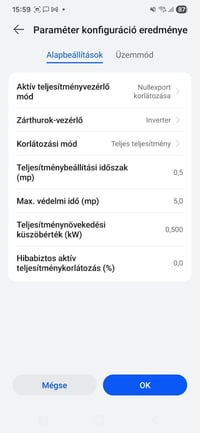
After completing these steps, feed-in limitation will be successfully configured on Huawei inverters.
If the system is controlled via **EMMA** or **SmartGuard** (which includes EMMA), the same configuration method applies — only select **EMMA** instead of the **Dongle** from the list of devices.
- [Deye](https://support.solar-kit.eu/en/knowledge-base/deye?hsLang=en#main-content)
- [Deye error codes](https://support.solar-kit.eu/en/knowledge-base/deye?hsLang=en#deye-error-codes)
- [Dyness](https://support.solar-kit.eu/en/knowledge-base/dyness?hsLang=en#main-content)
- [Dyness error codes](https://support.solar-kit.eu/en/knowledge-base/dyness?hsLang=en#dyness-error-codes)
- [FoxESS](https://support.solar-kit.eu/en/knowledge-base/foxess?hsLang=en#main-content)
- [FoxESS error codes](https://support.solar-kit.eu/en/knowledge-base/foxess?hsLang=en#foxess-error-codes)
- [Huawei](https://support.solar-kit.eu/en/knowledge-base/huawei?hsLang=en)
- [SolaX](https://support.solar-kit.eu/en/knowledge-base/solax?hsLang=en#main-content)
- [SolaX error codes](https://support.solar-kit.eu/en/knowledge-base/solax?hsLang=en#solax-error-codes)
- [General](https://support.solar-kit.eu/en/knowledge-base/general?hsLang=en)
- [Webshop User Guide](https://support.solar-kit.eu/en/knowledge-base/webshop-user-guide?hsLang=en)
[](http://solar-kit.eu)
**Knowledge Base** - [shop.solar-kit.eu](http://shop.solar-kit.eu)
Copyright © 2026, SOLARKIT Europe Ltd.