---
title: Huawei inverter displays
description: On the front panel of Huawei inverters, above the brand logo, there are three LED indicators. The following section explains the meanings of these three indicators.
---
[Skip to content](https://support.solar-kit.eu/en/knowledge-base/huawei-inverter-kijelzői#main-content)
- [English](https://support.solar-kit.eu/en/knowledge-base/huawei-inverter-kijelz%C5%91i)
- [Magyar](https://support.solar-kit.eu/hu/tudastar/huawei-inverter-kijelzői)
English
Show submenu for translations
[](https://support.solar-kit.eu/en/knowledge-base?hsLang=en)
Open main navigation
Close main navigation
- - [English](https://support.solar-kit.eu/en/knowledge-base/huawei-inverter-kijelz%C5%91i)
- [Magyar](https://support.solar-kit.eu/hu/tudastar/huawei-inverter-kijelzői)
English
Show submenu for translations
- [Go to the webshop](https://shop.solar-kit.eu/)
[Go to the webshop](https://shop.solar-kit.eu/)
How can we help?
- There are no suggestions because the search field is empty.
1. [SOLARKIT Knowledge Base](https://support.solar-kit.eu/en/knowledge-base?hsLang=en)
2. [Huawei](https://support.solar-kit.eu/en/knowledge-base/huawei?hsLang=en)
# Huawei inverter displays
**Huawei Inverter Displays**
On the front panel of Huawei inverters, above the brand logo, there are three LED indicators. The following section explains the meanings of these three indicators.
First, the meanings of the DC and AC indicators are described.
These indicators provide feedback related to the inverter’s basic operation and power generation capability.
| **Indicators** | **Status** | **Description** | |
| --- | --- | --- | --- |
| 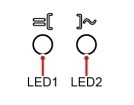 | **LED 1** | **LED 2** | The inverter operates in AC-coupled mode. |
| Steady green | Steady green | | |
| Flashing green with 1-second intervals (1s on, 1s off) | Off | The DC side is operational, while the AC side is not. | |
| Flashing green with 1-second intervals (1s on, 1s off) | Flashing green with 1-second intervals (1s on, 1s off | Both DC and AC sides are on, but the inverter is not supplying power to the loads. | |
| Off | Flashing green with 1-second intervals (1s on, 1s off) | The DC side is off, the AC side is operational. | |
| Steady orange | Steady orange | The inverter operates in off-grid mode. | |
| Slowly flashing orange | Off | The DC side is operational, and there is no output in off-grid mode. | |
| Slowly flashing orange | Slowly flashing orange | The inverter is under overload, operating in backup mode. | |
| Off | Off | Both DC and AC sides are off. | |
| Rapid red flashing (0.2s on, 0.2s off) | Off | DC-side fault. For example: one of the string input voltages is too high, strings are reversed, or insulation resistance is low. | |
| Off | Rapid red flashing | AC-side fault. For example: grid overvoltage, undervoltage, high or low frequency. | |
| Steady red | Steady red | Fault. | |
| 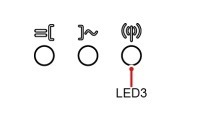 | LED 3 | Description | | |
| --- | --- | --- | --- | --- |
| Rapid green flashing (0.2s on, 0.2s off) | Communication link in progress (when a phone is connected to the inverter, the indicator flashes green with longer intervals, showing that the phone is connected). | | | |
| | Flashing green with 1-second intervals (1s on, 1s off) | Mobile phone connected. | | |
| | Off | No communication. | | |
| Device Replacement Indicator | **LED 1** | **LED 2** | **LED 3** | The inverter has a hardware fault, and the device needs replacement. |
| Steady red | Steady red | Steady red | | |
Additionally, the indicator located on the right side is responsible for communication. If all three LEDs are continuously red, the inverter has a hardware fault and most likely needs to be replaced.
- [Deye](https://support.solar-kit.eu/en/knowledge-base/deye?hsLang=en#main-content)
- [Deye error codes](https://support.solar-kit.eu/en/knowledge-base/deye?hsLang=en#deye-error-codes)
- [Dyness](https://support.solar-kit.eu/en/knowledge-base/dyness?hsLang=en#main-content)
- [Dyness error codes](https://support.solar-kit.eu/en/knowledge-base/dyness?hsLang=en#dyness-error-codes)
- [FoxESS](https://support.solar-kit.eu/en/knowledge-base/foxess?hsLang=en#main-content)
- [FoxESS error codes](https://support.solar-kit.eu/en/knowledge-base/foxess?hsLang=en#foxess-error-codes)
- [Huawei](https://support.solar-kit.eu/en/knowledge-base/huawei?hsLang=en)
- [SolaX](https://support.solar-kit.eu/en/knowledge-base/solax?hsLang=en#main-content)
- [SolaX error codes](https://support.solar-kit.eu/en/knowledge-base/solax?hsLang=en#solax-error-codes)
- [General](https://support.solar-kit.eu/en/knowledge-base/general?hsLang=en)
- [Webshop User Guide](https://support.solar-kit.eu/en/knowledge-base/webshop-user-guide?hsLang=en)
[](http://solar-kit.eu)
**Knowledge Base** - [shop.solar-kit.eu](http://shop.solar-kit.eu)
Copyright © 2026, SOLARKIT Europe Ltd.