---
title: Deye Operating Modes
description: In the case of Deye inverters, there are three available basic operating modes.
---
[Skip to content](https://support.solar-kit.eu/en/knowledge-base/deye-működési-módok#main-content)
- [English](https://support.solar-kit.eu/en/knowledge-base/deye-m%C5%B1k%C3%B6d%C3%A9si-m%C3%B3dok)
- [Magyar](https://support.solar-kit.eu/hu/tudastar/deye-működési-módok)
English
Show submenu for translations
[](https://support.solar-kit.eu/en/knowledge-base?hsLang=en)
Open main navigation
Close main navigation
- - [English](https://support.solar-kit.eu/en/knowledge-base/deye-m%C5%B1k%C3%B6d%C3%A9si-m%C3%B3dok)
- [Magyar](https://support.solar-kit.eu/hu/tudastar/deye-működési-módok)
English
Show submenu for translations
- [Go to the webshop](https://shop.solar-kit.eu/)
[Go to the webshop](https://shop.solar-kit.eu/)
How can we help?
- There are no suggestions because the search field is empty.
1. [SOLARKIT Knowledge Base](https://support.solar-kit.eu/en/knowledge-base?hsLang=en)
2. [Deye](https://support.solar-kit.eu/en/knowledge-base/deye?hsLang=en)
# Deye Operating Modes
## In the case of Deye inverters, there are three available basic operating modes.
This article introduces these three modes, explains when each should be used, and shows where to find these settings.
### **The three configuration options:**
- **selling first**
- **zero export to load**
- **zero export to CT**
In **selling first** mode, the system sells all generated energy immediately when the inverter’s grid port is connected to the grid. This setting is typically used in power plant applications.
The **zero export to load** mode allows the inverter to supply power only to its **load port**. This mode is recommended when a **critical load circuit** has been set up and you don’t want to “waste” energy on less important consumers.
In **zero export to CT** mode, the inverter can deliver power to both connection points. This is the most commonly used setting.
---
Now, let’s see how to access these settings.
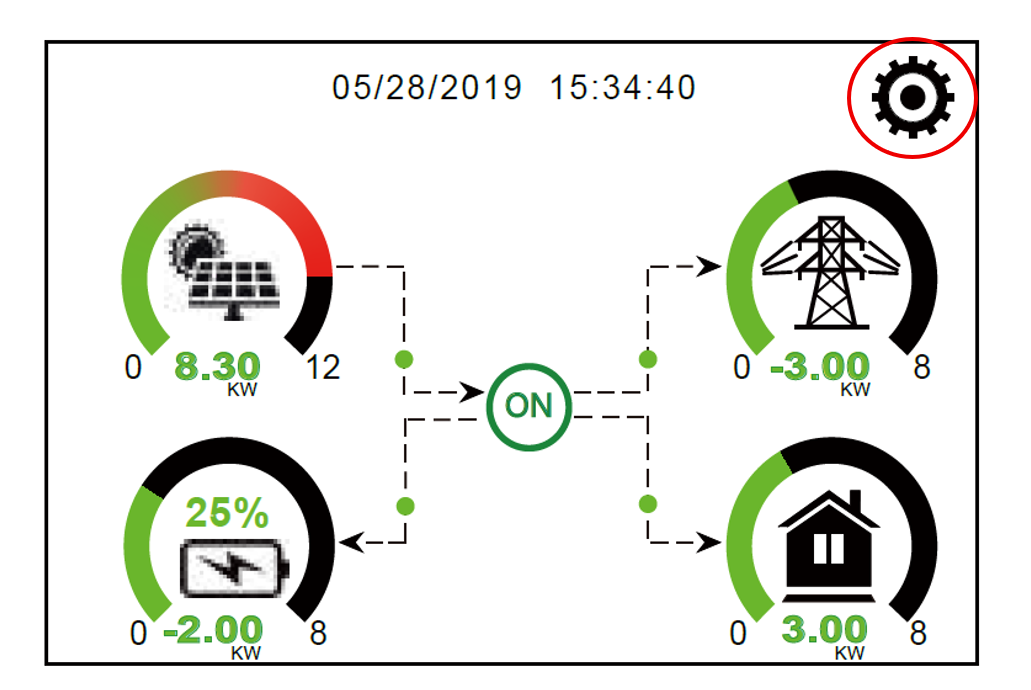
**Step 1:** Press the **gear icon** in the upper right corner.
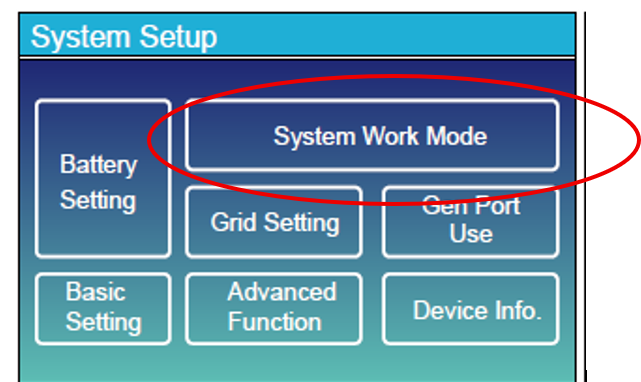
**Step 2:** Select **System Work Mode**.
**Step 3:** Place the checkmark next to the operating mode you wish to use.
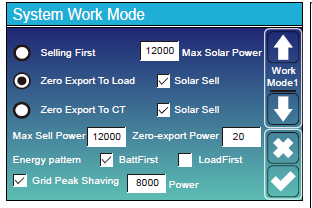
Save the setting by confirming with the **checkmark icon**.
- [Deye](https://support.solar-kit.eu/en/knowledge-base/deye?hsLang=en#main-content)
- [Deye error codes](https://support.solar-kit.eu/en/knowledge-base/deye?hsLang=en#deye-error-codes)
- [Dyness](https://support.solar-kit.eu/en/knowledge-base/dyness?hsLang=en#main-content)
- [Dyness error codes](https://support.solar-kit.eu/en/knowledge-base/dyness?hsLang=en#dyness-error-codes)
- [FoxESS](https://support.solar-kit.eu/en/knowledge-base/foxess?hsLang=en#main-content)
- [FoxESS error codes](https://support.solar-kit.eu/en/knowledge-base/foxess?hsLang=en#foxess-error-codes)
- [Huawei](https://support.solar-kit.eu/en/knowledge-base/huawei?hsLang=en)
- [SolaX](https://support.solar-kit.eu/en/knowledge-base/solax?hsLang=en#main-content)
- [SolaX error codes](https://support.solar-kit.eu/en/knowledge-base/solax?hsLang=en#solax-error-codes)
- [General](https://support.solar-kit.eu/en/knowledge-base/general?hsLang=en)
- [Webshop User Guide](https://support.solar-kit.eu/en/knowledge-base/webshop-user-guide?hsLang=en)
[](http://solar-kit.eu)
**Knowledge Base** - [shop.solar-kit.eu](http://shop.solar-kit.eu)
Copyright © 2026, SOLARKIT Europe Ltd.