---
title: Deye Generator Charging
description: Deye hybrid inverters can be connected to a lithium battery, which can also be charged from a generator. This can be particularly useful during winter months or in locations where operational reliability is a top priority.
---
[Skip to content](https://support.solar-kit.eu/en/knowledge-base/deye-generator-charging#main-content)
- [English](https://support.solar-kit.eu/en/knowledge-base/deye-generator-charging)
- [Magyar](https://support.solar-kit.eu/hu/tudastar/deye-generátoros-töltés)
English
Show submenu for translations
[](https://support.solar-kit.eu/en/knowledge-base?hsLang=en)
Open main navigation
Close main navigation
- - [English](https://support.solar-kit.eu/en/knowledge-base/deye-generator-charging)
- [Magyar](https://support.solar-kit.eu/hu/tudastar/deye-generátoros-töltés)
English
Show submenu for translations
- [Go to the webshop](https://shop.solar-kit.eu/)
[Go to the webshop](https://shop.solar-kit.eu/)
How can we help?
- There are no suggestions because the search field is empty.
1. [SOLARKIT Knowledge Base](https://support.solar-kit.eu/en/knowledge-base?hsLang=en)
2. [Deye](https://support.solar-kit.eu/en/knowledge-base/deye?hsLang=en)
# Deye Generator Charging
## Deye hybrid inverters can be connected to a lithium battery, which can also be charged from a generator. This can be particularly useful during winter months or in locations where operational reliability is a top priority.
In this article, we will show how to enable generator-based charging on Deye inverters. This feature is especially beneficial for long-term durability or in areas with unstable or unpredictable grid conditions. In such cases, the system can be charged from the generator, and the stored energy can later be used.
**Step 1:** Log in to **Deye Cloud**.
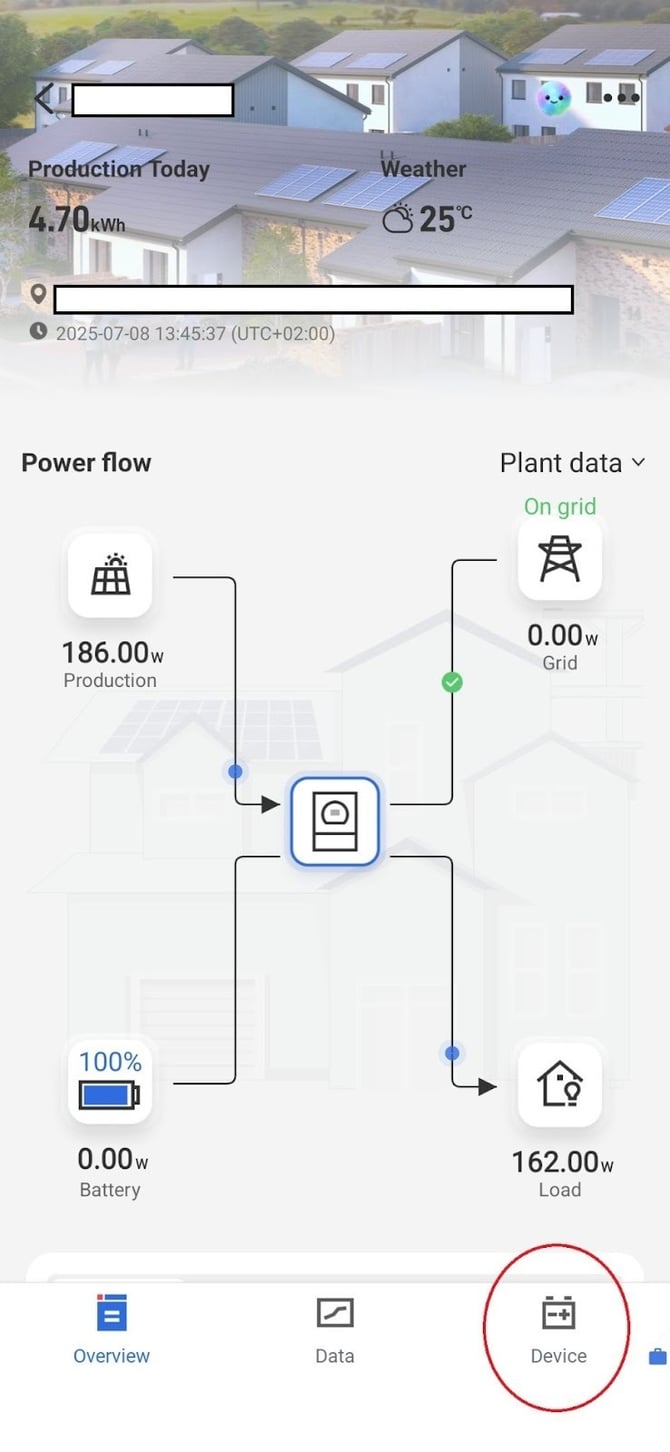
**Step 2:** Select the **Devices** menu at the bottom of the screen.
**Step 3:** Within the Devices menu, select the inverter located at the desired plant.
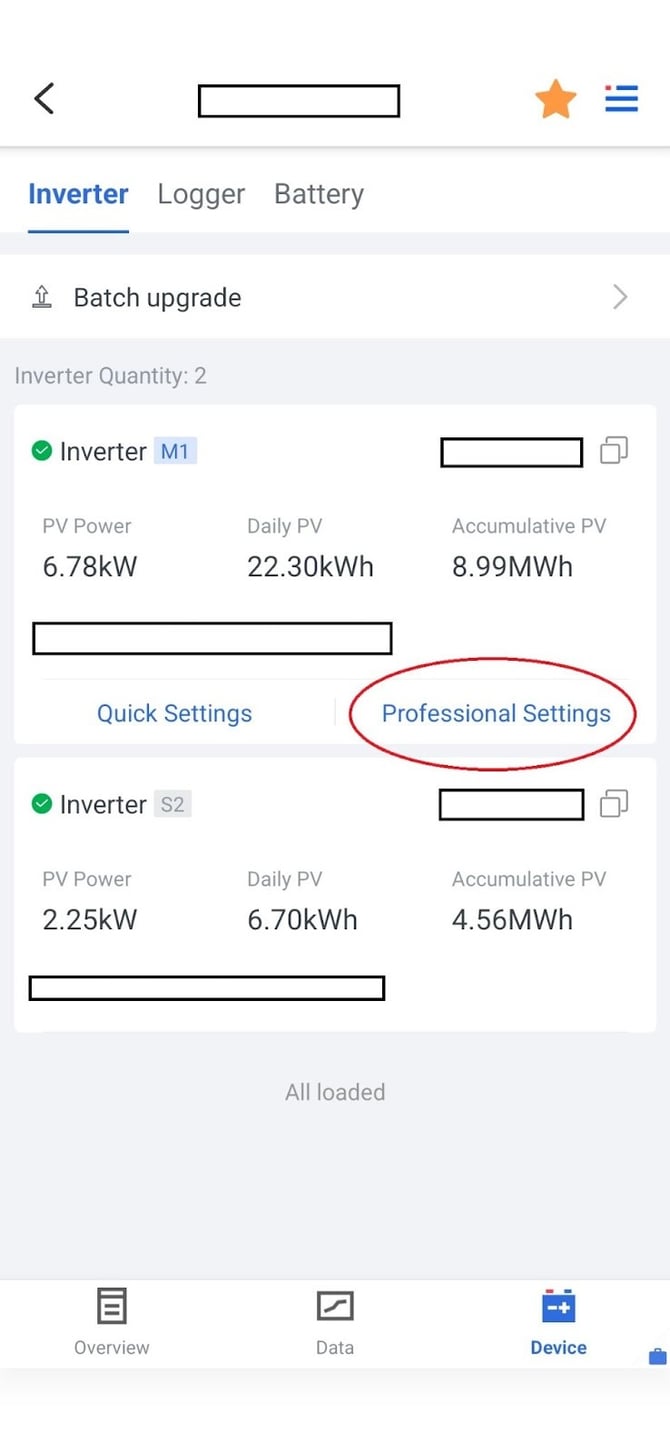
In this menu, choose the **Professional Settings** option, where you can configure detailed settings for both the inverter and the battery.
**Step 4:** Within the settings, the battery options appear at the top of the list.
Before making any modifications, always use the **Read** button to load the currently configured values.
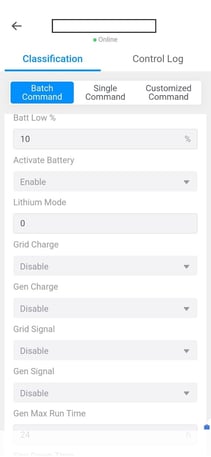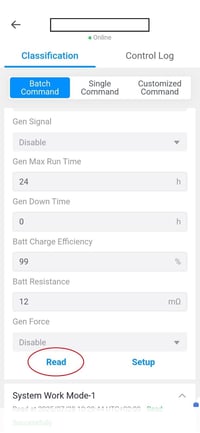
**Step 5:** Within this section, locate the **Grid Charge** option — set this to *Enable* if you wish to allow charging from the grid. Once enabled, you can set the state of charge (%) at which the system begins charging from the grid.
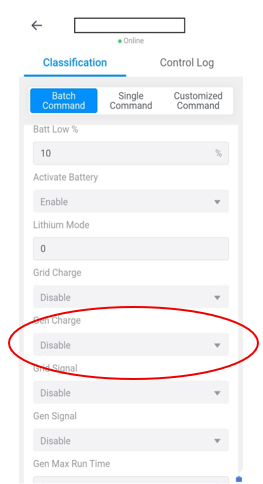
If you know your requirements precisely, you can fine-tune the target charge levels in the **Time of Use** table, and the system will manage this automatically.

All six time slots can be configured individually.
If you tick the **Gen Charge** checkbox, generator charging will be active during the selected period, and the system will charge the battery up to the specified percentage value — provided there is sufficient time to do so.
Always start the configuration process by using the **Read** function, and after modifying any values, use **Setup** to save the changes.
If your generator is equipped with a compatible control interface, the inverter can automatically start and stop the generator.
- [Deye](https://support.solar-kit.eu/en/knowledge-base/deye?hsLang=en#main-content)
- [Deye error codes](https://support.solar-kit.eu/en/knowledge-base/deye?hsLang=en#deye-error-codes)
- [Dyness](https://support.solar-kit.eu/en/knowledge-base/dyness?hsLang=en#main-content)
- [Dyness error codes](https://support.solar-kit.eu/en/knowledge-base/dyness?hsLang=en#dyness-error-codes)
- [FoxESS](https://support.solar-kit.eu/en/knowledge-base/foxess?hsLang=en#main-content)
- [FoxESS error codes](https://support.solar-kit.eu/en/knowledge-base/foxess?hsLang=en#foxess-error-codes)
- [Huawei](https://support.solar-kit.eu/en/knowledge-base/huawei?hsLang=en)
- [SolaX](https://support.solar-kit.eu/en/knowledge-base/solax?hsLang=en#main-content)
- [SolaX error codes](https://support.solar-kit.eu/en/knowledge-base/solax?hsLang=en#solax-error-codes)
- [General](https://support.solar-kit.eu/en/knowledge-base/general?hsLang=en)
- [Webshop User Guide](https://support.solar-kit.eu/en/knowledge-base/webshop-user-guide?hsLang=en)
[](http://solar-kit.eu)
**Knowledge Base** - [shop.solar-kit.eu](http://shop.solar-kit.eu)
Copyright © 2026, SOLARKIT Europe Ltd.