
When a user is deactivated for any reason, you cannot create a new account with the same email address, and the user cannot log in.
In such cases, reactivating the existing account is necessary.
Here’s how to do it:
- Log in to the FusionSolar application.
- Under the System menu, select Company Management.
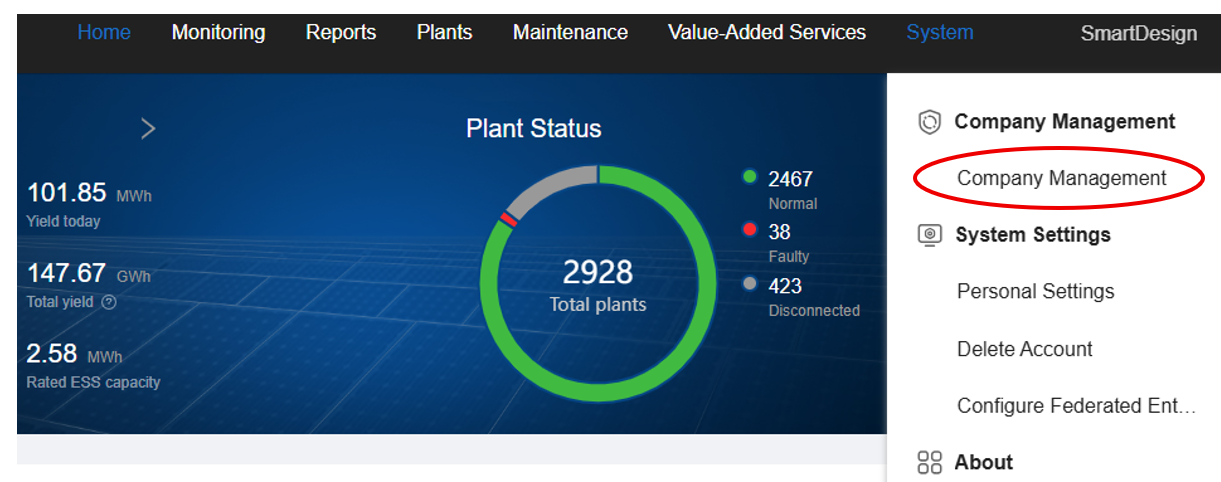
- A window will appear

search for the user by their email address or username to locate their profile.

- Once the user appears, you will see an arrow-around-a-lock icon on the right side of the screen.
- Click this icon to reactivate the user.
Once the user appears, you will see an arrow-around-a-lock icon on the right side of the screen.
Click this icon to reactivate the user.
Confirm the warning message that appears — after that, the user account will be successfully reactivated.